BreezeBrowser Pro can sort thumbnail images in a variety of different orders. To change the order in which thumbnails are displayed select "Image Order" from the "View" menu.
The available sort methods are:
| 1. | Sort Alphabetically - Images are sorted alphabetically using their filenames. Use this option if you use Zoombrowser to transfer you images from your camera. |
| 2. | Sort Numerically - Images are sorted numerically using the first group of numbers found in the filename. If duplicate numbers are found the images are sorted alphabetically. Use this option if you use Downloader or a cardreader to transfer you images from your camera. |
| 3. | Sort by File Type - Images are sorted alphabetically using their type followed by their name. Use this option if you would like images of the same type to be grouped together. |
| 4. | Sort by Timestamp - Images are sorted according to their EXIF date and time (or file creation time if the EXIF date and time aren't available). If images have the same timestamp they are sorted alphabetically. Use this option if you use a filenaming scheme which doesn't lend itself to sorting by filename or if the directory contains images from more than one camera. |
| 5. | Custom Order - the image order can be changed by dragging and dropping thumbnails in thumbnail view. This is useful if you wish to change the order in which images are displayed in HTML pages or on contact sheets. |
In addition there is an option to reverse the order in which images are sorted. One use for this is to sort images so that the most recent ones appear first.
To enable custom order simply drag one or more thumbnails and drop them in their new positions. The image order and sort method is saved when you leave a directory and restored when the directory is revisited.
Sort by shooting data
Select "Sort by shooting data..." from the View menu or type Shift+Ctrl+7 to sort images using their shooting data. The dialog below will be displayed:
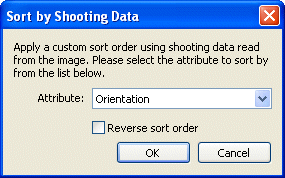
Select the attribute you wish to sort by from the drop down list. When the images are sorted the selected attribute is compared first. If two images have the same attribute (e.g. they are both landscape orientation when sorting by orientation) they will be sorted alphabetically.
Notes:
| 1. | Sorting by shooting data has the same effect as a custom order and needs to be run again if new images are added to the folder or their attributes change. |
| 2. | Sorting by latitude will sort the images by decreasing order of latitude i.e. most northerly images first |
| 3. | Sorting by longitude will sort the images by increasing order of longitude i.e. most westerly images first |