Select "Time-lapse..." from the "Camera" menu to take time-lapse shots. With cameras from the Canon EOS-1D Mark IV, Canon EOS-1D Mark III, Canon EOS-1Ds Mark III, Canon EOS 5DS R, Canon EOS 5DS, Canon EOS 5D Mark IV, Canon EOS 5D Mark III, Canon EOS 5D Mark II, Canon EOS 6D, Canon EOS 7D, Canon EOS 7D Mark II, Canon EOS 70D, Canon EOS 60D, Canon EOS 50D, Canon EOS 40D, Canon EOS 600D/Rebel T3i, Canon EOS 550D/Rebel T2i, Canon EOS 500D/Rebel T1i, Canon EOS 450D/Rebel XSi, Canon EOS 1100D/Rebel T3 and Canon EOS 1000D/Rebel XS onwards this dialog can also be used to control timed bulb exposures.
The time lapse sequence can be set to start immediately or to start at a particular time and date. You can either specify an end time and date for the time lapse sequence or the number of frames in the sequence.
You can specify the interval between shots.
Note: If you set the interval to a time shorter than that required to take and download the picture the sequence will run as fast as possible.
Press the "Start" button to start the time lapse sequence.
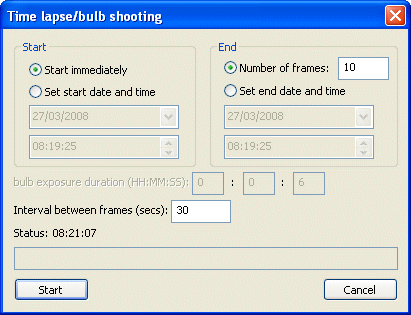
When using a camera that supports timed bulb exposures the "bulb exposure duration" settings will be displayed in this dialog. These settings will be available if the camera's shutter speed is set to "bulb" otherwise they will be grayed out as shown in the screenshot above. The bulb exposure duration can be set to any number of hours, minutes and seconds up to 24 hours and will start when the "Start" button is pressed. The bulb exposure can be canceled at any time by pressing the "Cancel" button.