This plug-in automatically creates a DNG version of raw image files as they are downloaded. It uses Adobe's free DNG converter (which must be downloaded separately) to convert the raw files to DNG format. Please see Adobe's website for more information about the DNG file format: http://www.adobe.com/dng
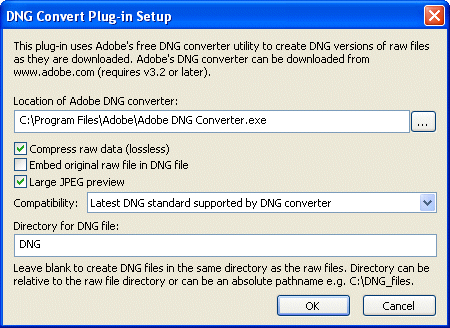
In order to use this plug-in you must first download and install Adobe's DNG Converter on your PC. This is free and can be downloaded from http://www.adobe.com/dng. This is regularly updated by Adobe to support new cameras as they become available.
Next enter the location of the DNG converter by pressing the "..." browse button and select the required options.
The compatibility dropdown list can be used to select older versions of the DNG standard for compatibility with older versions of Adobe Camera Raw, Photoshop and Lightroom. This is useful if you have an older version of Photoshop or Lightroom which does not support raw conversion for a new camera e.g. if you have Photoshop CS and wish to convert raw files from a Canon EOS 5D Mark II or a Nikon D700 the compatibility should be set to "Camera Raw 2.4 and later (Photoshop CS/Lightroom 1.0)". This will tell the DNG converter to generate DNG files which are compatible with Photoshop CS and Lightroom 1.0.
The compatibility setting only needs to be changed from its default value of "Latest DNG standard supported by DNG converter" if you need to generate DNG files which are compatibile with older versions of Photoshop, Lightroom or other software.
By default the DNG file is stored in the same directory as the raw file. You can specify a different directory for the DNG files by entering the path in the "Directory for DNG file:" text box. This can be specified as a relative path as in the screenshot above or an absolute path such as "C:\DNG files".
Examples of different DNG directory paths:
Directory |
Description |
DNG |
Creates DNG files in a sub directory called DNG relative to the raw files. e.g. raw file path: C:\Photos\2005-11-12\IMG_1234.CR2 |
C:\DNG files |
Creates DNG files in the directory "C:\DNG files" |
D:\DNG\{Y}\{Y}-{m}-{D} |
Creates DNG files in a directory using the date the picture was taken e.g. the DNG file from a raw file taken on Nov 2, 2005 would be stored in D:\Photos\2005\2005-11-05 |
Please note that it takes several seconds for the DNG converter to convert each file and so it will take longer to download files when this plug-in is used.
Adobe, Photoshop and Lightroom are registered trademarks of Adobe Systems Incorporated.