This article covers material from the old Breeze website; and was last updated in 2018.
There are two ways multiple cameras can be fired at the same time using Multi-Camera which are described below. In order to eliminate variable delays due to auto-focus the cameras should be set to manual focus and pre-focused before taking the photos.
- Using Multi-Camera to trigger the cameras: This can be done by selecting “Gang camera shutter releases together” in preferences and then pressing the “Release” button in the main window. Multi-Camera instructs each camera to take a picture as quickly as possible and each camera will be triggered in turn with a delay of approximately 1/6 sec between each camera. This means if there are 18 cameras it will take approximately 3 secs from when the first camera takes a picture until the last camera takes a picture.
When capturing video the cameras will start one after the other with a delay of approximately 1/10th sec between each camera. Better video synchronization can be achieved using Canon EOS-1D C, Canon EOS-1D X and Canon EOS 5D Mark III cameras by triggering them using the remote release connection. - Triggering the cameras using the remote release connection: Canon EOS cameras have remote release sockets which allow the camera to be fired by simply using a switch. Multiple cameras can be fired at the same time by plugging cables into the remote release socket of each camera and wiring these together to a master switch. The cameras won’t all trigger at exactly the same time due to variations in the response time of each camera but they will usually all fire within approximately 1 ms to 5 ms of each other (the variation depends on camera model, lens type etc.). This variation can be reduced by activating the auto-focus via the remote release cables just before taking the photo.
This technique can also be used to start and stop video capture when using Canon EOS-1D C, Canon EOS-1D X or Canon EOS 5D Mark III cameras. To enable this the cameras need to be setup so that the shutter release button is configured to start/stop video capture (please see the camera instruction manual for details on how to set this up). The 5D Mark III must also be set to movie mode by setting the movie/camera switch to the movie position.
Using the remote release socket to fire multiple cameras at once
The remote release sockets on EOS cameras are either a proprietary three-pin socket (higher end camera models) or a simpler standard 2.5mm jack plug with three connections. Both socket types work in exactly the same way and provide a way of remotely sending shutter release half and full press signals to the camera. Remote release switches and cables can be bought as accessories from Canon or more cheaply from eBay.
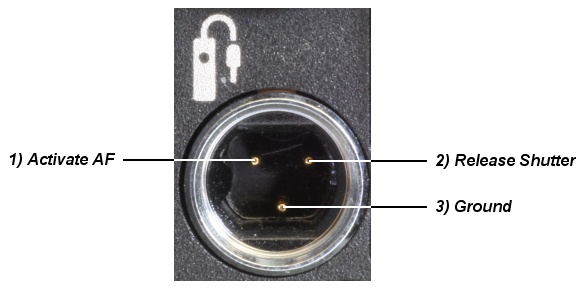
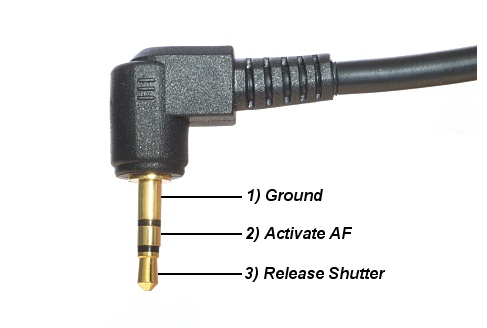
The remote release switch has two positions similar to the camera’s shutter release button. Half-pressure on the release switch activates the camera’s auto-focus by connecting the “Ground” and “Activate AF” pins together. Full pressure on the release switch releases the camera’s shutter by connecting the “Ground” and “Release Shutter” pins together. It isn’t necessary to activate the auto-focus in order to release the shutter and a picture can be taken by only connecting the “Ground” and “Release Shutter” pins together. Activating the auto-focus releasing the shutter puts the camera into a heightened state of readiness and will reduce the variations between cameras.
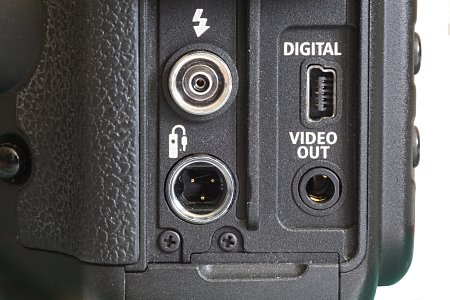
Remote release connector for mid to high end Canon cameras e.g. Canon EOS-1D C, EOS-1D X Mark II, 5D Mark IV, 5D Mark III, 6D and older xxD models
Canon mid to high end cameras (remote release socket is bottom left)
Pinout for the remote release socket for Canon mid to high end cameras

Remote release connector for Rebel series and recent mid range cameras e.g. Canon EOS 80D, 77D, 70D, 800D/Rebel T7i, 760D/Rebel T6s, 750D/Rebel T6i, 700D/Rebel T5i, 1300D/Rebel T6, 1200D/Rebel T5, 200D/Rebel SL2, 100D/Rebel SL1
Rebel series and recent mid range cameras (the 2.5mm jackplug socket in the middle is the remote release socket)
2.5mm 3-connection jackplug for the above cameras.
Triggering all the cameras at the same time
The simplest way to trigger all the cameras at the same time (to within a few milliseconds of each other) is to use a simple passive trigger system like the one shown below:
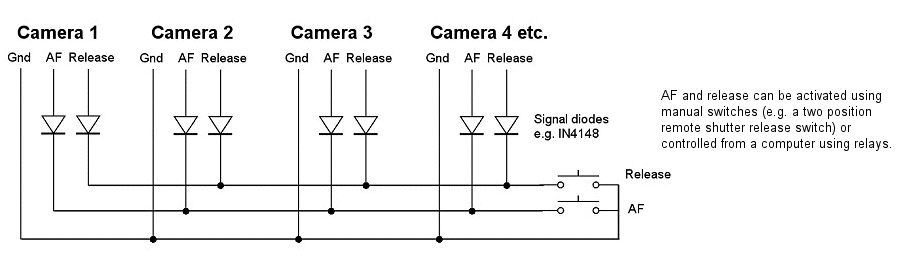
This type of trigger can be used to trigger up to 50 cameras. The diodes shown above may be omitted when trigger small numbers of cameras, but are essential for the reliable trigger of larger arrays.
If you do not wish to make your own trigger or you need programmable delays in order to synchronize cameras with flash you can use a commercial unit such as the Esper’s Trigger box. The TriggerBox is a high quality unit which can trigger up to 6 cameras. Multiple units can be linked together to trigger larger numbers of cameras. Please vist Esper for more information about the TriggerBox. The TriggerBox has a programmable delay for each channel which makes it suitable for triggering flash in sync with multiple cameras.
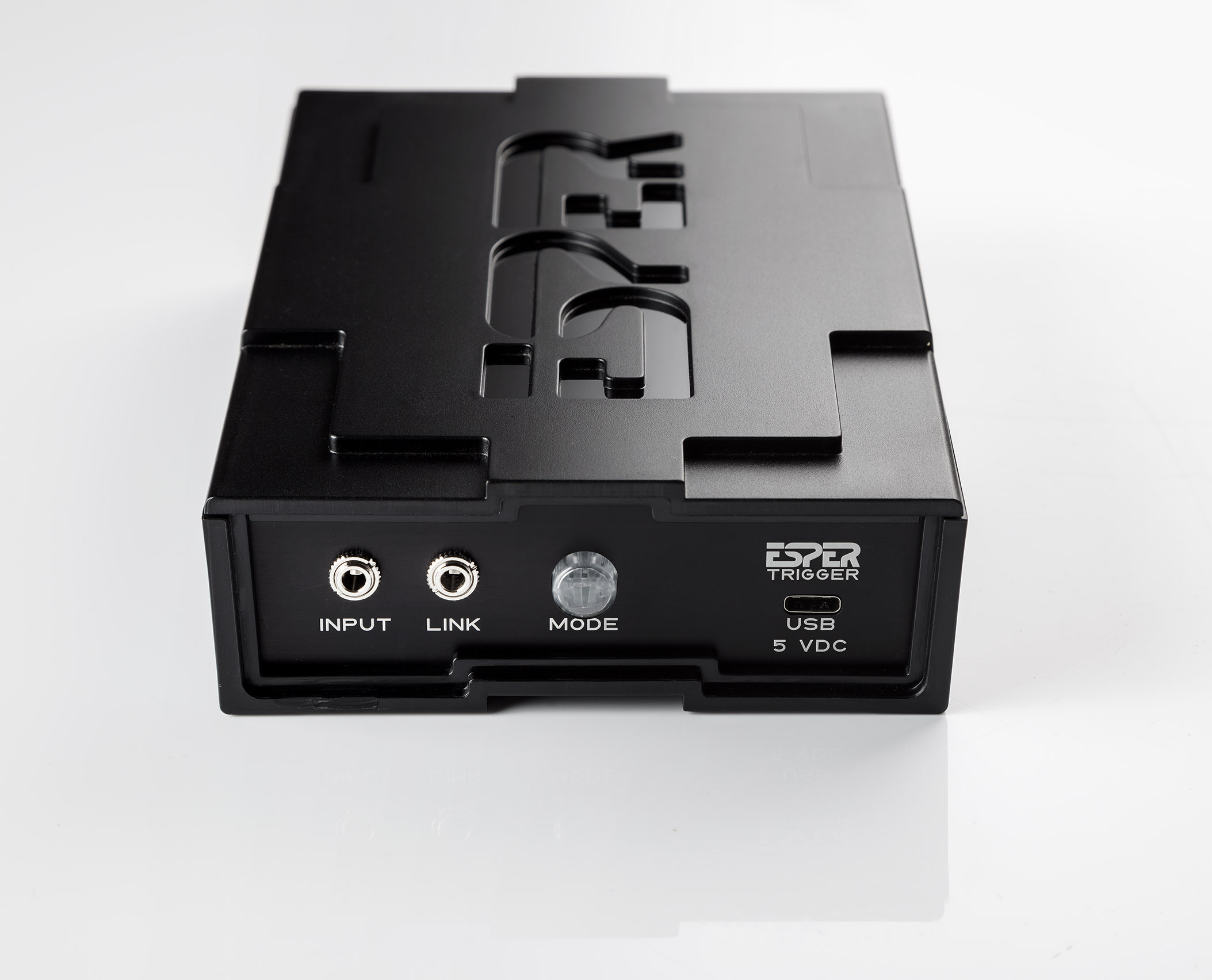
Esper trigger (Image courtesy of Esper)
More sophisticated ways to trigger cameras
If you need a more sophisticated trigger system, e.g. triggering each in sequence camera with a delay between each camera, you will need to use a sequencer, a commercial trigger such as the TriggerBox or to build your own microprocessor controlled trigger.
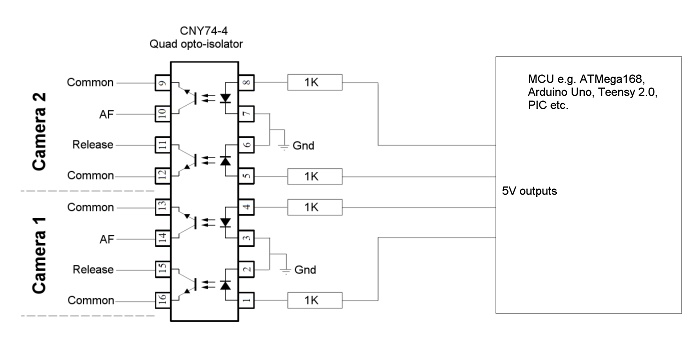
Diagram showing how a microprocessor can trigger cameras using opto-isolators
Typical Setups
A typical setup to control and trigger 16 Canon EOS cameras from a single PC would consist of:
- A PC or laptop running Windows 11, Windows 10 or Windows 8 and our Multi-Camera software
- A 4 port USB hub connected to one USB port on the PC with a further four 4 port USB hubs connected to each of its ports. The USB cables from the cameras plug directly into the USB ports on the USB hubs. The USB hubs should be externally powered for maximum reliability.
- A camera trigger system such as the simple passive trigger, above, or a commercial trigger such as the TriggerBox. The trigger is connected to the remote release sockets of the cameras and usually has a handheld remote release switch to trigger the cameras.
Most modern laptops can control up to 32 cameras using this type of setup. Desktop PCs can often control more cameras e.g. up to 70 cameras. For larger arrays of cameras you can use multiple computers networked together, each running a copy of Multi-Camera. Please see this section of the Multi-Camera help file for more information.
Please note: The maximum USB cable length allowed by the USB standard is 5m (approx 16 feet). This can be extended by using USB hubs but you are only allowed a maximum of 3 hubs daisy chained together (giving a maximum cable length of 20m). You can buy active USB cables which can be daisy chained together but please be aware that these are really cables with a self-powered USB hub on the end. Self-powered USB hubs draw power from the USB interface instead of using an external power supply and tend to be less reliable than externally powered hubs.
In operation Multi-Camera is used to control the camera settings and manage the downloading and naming of the images and the trigger system is used to trigger the cameras.
Synchronizing multiple cameras with flash
The simplest way to synchronize multiple cameras with flash is to use a slower than normal shutter speed (e.g. 1/10 to 1/30 sec) and to trigger the flash approximately 80ms to 120ms after triggering the cameras (the length of the delay will depend on the shutter lag of the cameras being used). There is some variation in the shutter lags of the cameras even when using one model of camera in the rig. This variation is typically only a few milliseconds but this is sufficient to cause problems if the flash is triggered from the hotshoe of one of the cameras because the flash is likely to fire before the shutters are fully open on all the cameras. Selecting a slower than normal shutter speed increases the length of time that the shutters are fully open on all the cameras and when the flash can be fired.
The most reliable way to trigger the flash is to connect it to the camera trigger with a delay of approximately 5 milliseconds longer than the shutter lags of the cameras. This will require the use of a sophisticated camera trigger with programmable delays for each channel. This method will reliable flash sync with slightly higher shutter speeds (e.g. 1/30 to 1/60 sec) than alternative methods. The TriggerBox from Esper has programmable delays for each trigger channel and is suitable for triggering flash in sync with multiple cameras.
A simpler, but slightly less accurate way to trigger the flash is to trigger it from the hotshoe of one of the cameras with a delay of approximately 5 milliseconds. This is less accurate than the first method because the camera triggering the flash could be the first camera in the array to open its shutter or the last camera in the array. A slightly longer shutter speed (e.g. 1/10 to 1/30 sec) needs to be used to allow for this variation in timing. The flash could be triggered using a PocketWizard Plus Multimax trigger which has a programmable delay (unfortunately this model has been discontinued). A novel alternative is to use an extra camera to trigger the flash by setting the shutter speed to 1/30 sec and selecting second curtain sync.
Putting it all together
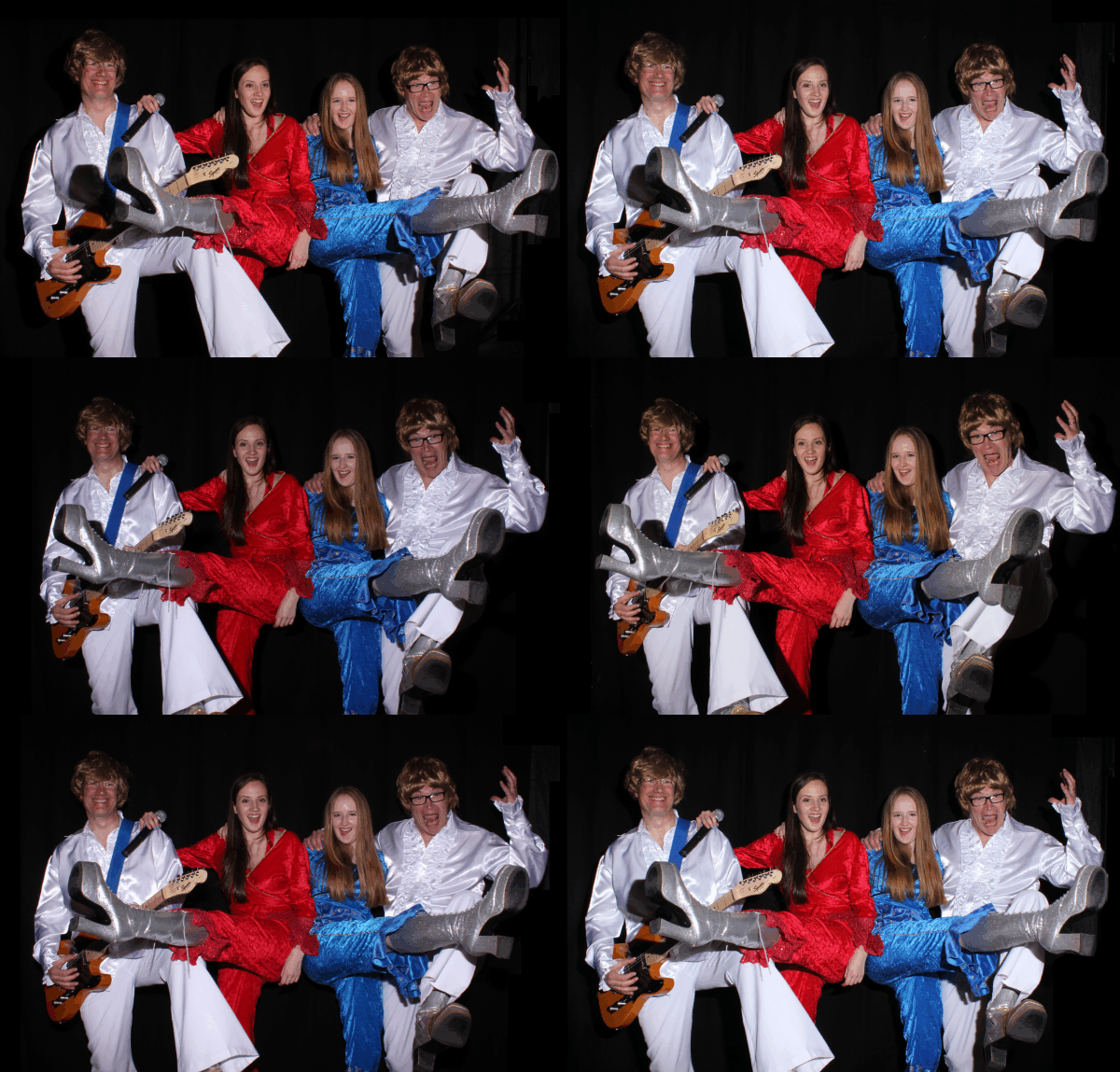
This animated GIF was taken using 5 camera rig comprising 4 different camera models: 2 x Canon EOS 600D (aka Rebel T3i), 1 x Canon EOS 650D (aka Rebel T4i), 1 x Canon EOS 700D (aka Rebel T5i), 1 x Canon EOS 1200D (aka Rebel T5). A single Yongnuo YN-568EX II flash was used for the lighting
An arduino based programmable trigger with 8 channels was used to trigger the cameras and flash. The external release connections of the cameras were connected to the first 5 channels of the trigger and different delays were set for each channel to ensure that all the cameras opened their shutters at the same time. The flash was connected to channel 6 of the trigger and programmed with a delay of 5 millisconds longer than the cameras so that the flash fired when all the camera shutters are fully open.
The cameras were connected to a Windows 10 laptop via USB. The USB cables from each camera were connected to a 6-port USB hub which was connected to the laptop. The USB hub was externally powered for maximum reliability.
Multi-Camera was used to control the cameras and to automatically download the photos to the laptop. The Multi-Camera Animator was used to align the photos from the cameras and create animated GIFs which were displayed to guests using Breeze Kiosk. All three pieces of software were running on the same laptop computer.
A simple radio remote shutter release was connected to the input of the trigger so that the whole system could be operated using a hand held release. After pressing the remote release it took approximately 10 to 15 seconds to download the photos from all the cameras, create the animated GIF and present it to the guests in Kiosk. Over 90 sets of photos were taken in just under three hours at the party where the “Abba” photo above was taken.
Please note: The 8 channel arduino based trigger used for this system was designed and built by Chris Breeze for experimental purposes only. This trigger is not available for sale (Breeze Systems only develops software and does not sell hardware). Similar results can be achieved using a commercial trigger such as Esper’s Trigger box.